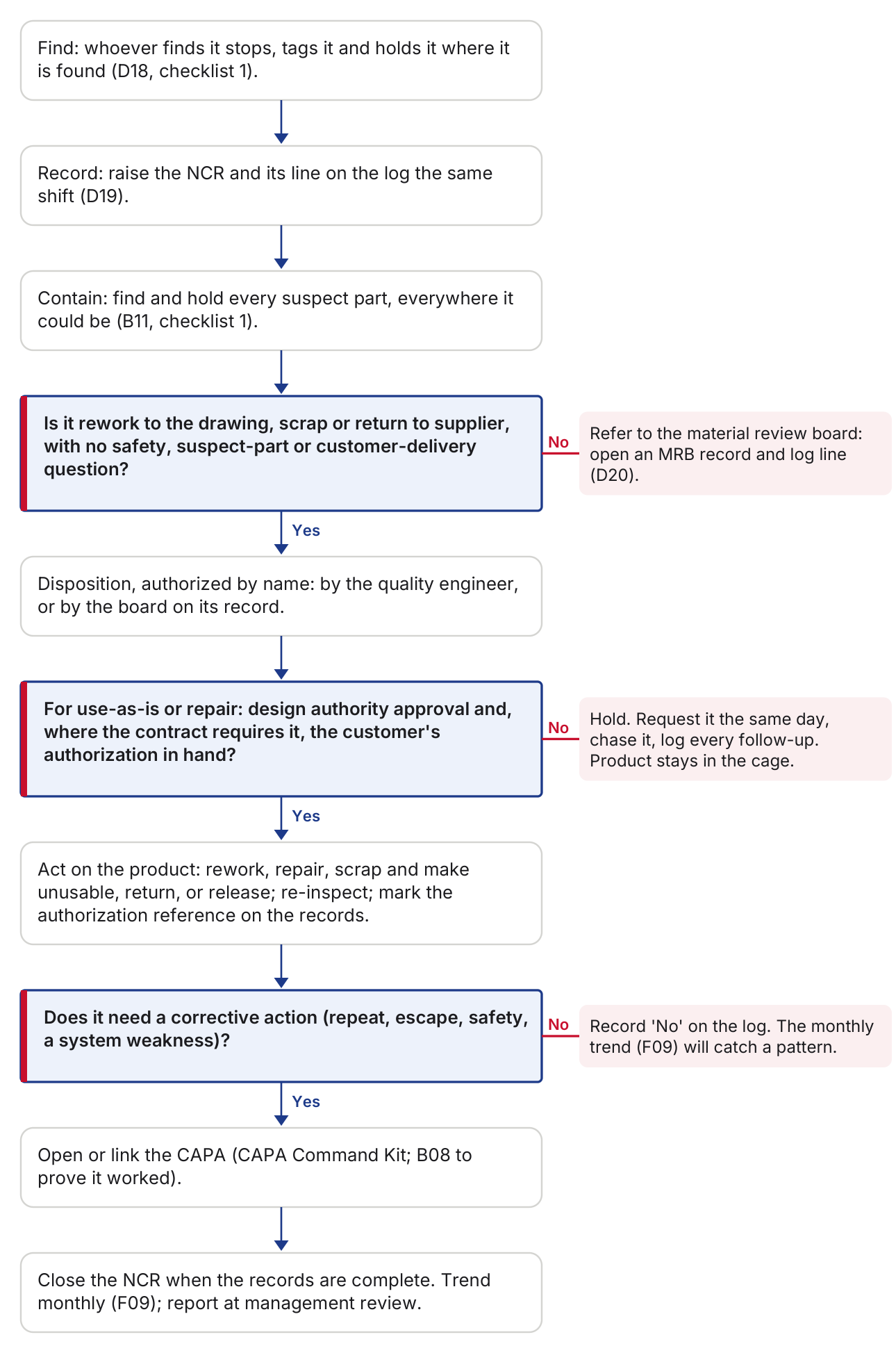
Every nonconformance moves through the same seven stages, set out in the table and then the chart. In the chart the shaded boxes are gates: Yes continues down, No goes to the note on the right.
| Stage | Purpose | Tool | Done when | AS9100D |
|---|---|---|---|---|
| Find | Stop it moving | D18 | Tagged where found, within minutes | 8.7.1 |
| Record | One line for every NC | D19 | Log line with the requirement, not just the defect | 8.7.2 |
| Contain | Protect the customer | B11 | Every location answered, even 'none' | 8.7.1 |
| Decide | The right decision by the right person | D19, D20 | Disposition with a name and a date; MRB record for anything beyond routine | 8.7.1 |
| Authorize | Approvals before release | D20 | Design authority and, where the contract requires it, the customer, in hand | 8.7.1 |
| Act | Do what was decided | D18, D20 | Product action done, re-inspected, marked | 8.7.1 |
| Learn | Stop it coming back | F09, B08 | CAPA decision on every line; monthly trend | 10.2, 9.1.3 |
- Find: whoever finds it stops, tags it and holds it where it is found (D18, checklist 1).
- Record: raise the NCR and its line on the log the same shift (D19).
- Contain: find and hold every suspect part, everywhere it could be (B11, checklist 1).
- Decision: Is it rework to the drawing, scrap or return to supplier, with no safety, suspect-part or customer-delivery question? If yes, continue to the next step.No:Refer to the material review board: open an MRB record and log line (D20).
- Disposition, authorized by name: by the quality engineer, or by the board on its record.
- Decision: For use-as-is or repair: design authority approval and, where the contract requires it, the customer's authorization in hand? If yes, continue to the next step.No:Hold. Request it the same day, chase it, log every follow-up. Product stays in the cage.
- Act on the product: rework, repair, scrap and make unusable, return, or release; re-inspect; mark the authorization reference on the records.
- Decision: Does it need a corrective action (repeat, escape, safety, a system weakness)? If yes, continue to the next step.No:Record 'No' on the log. The monthly trend (F09) will catch a pattern.
- Open or link the CAPA (CAPA Command Kit; B08 to prove it worked).
- Close the NCR when the records are complete. Trend monthly (F09); report at management review.
Need more than one resource, or not sure where to start? Book a complimentary 30-minute Aegis Quality Guidance Call. We'll find the tools that fit your situation and a sensible place to start. No sales pressure, no obligation.
A management aid, not certification or a registrar audit. Using it does not by itself show conformity to AS9100D or any other standard, and your customers' requirements may add to it.
Clause numbers refer to AS9100D (SAE AS9100 Rev D) unless another document is named. The standards' text is not reproduced here: use your own licensed copy.
Aegis Insights are our own guidance, labeled wherever they appear: how we approach this work, not a requirement of any standard or customer.